Tuesday, 11 April 2017

And these are the winners of Kahoot! in Years 5A & 5B!

This was the first Kahoot! game for Years 5A & 5B pupils. They loved it so much that they are looking forward to playing it again. 
We played this Kahoot! in order to revise the contents we have learned in Science. What a fun way of revision, isn't it!

From left to right: Alejandro, Luzena and Esther. First winners of Kahoot! in Year 5A! Congrats!
Left to right: Rubén, Marina, Esther and Beatriz. First winners of Kahoot! in Year 5B. Well done!

Thursday, 24 November 2016

Revising our Energy unit with mind maps

In Year 5A and 5B we have revised our unit about energy by using an online tool called Popplet. This tool allows to create mind maps on our computer screen.

Here are the popplets designed by the students in class:

FORMS OF ENERGY


ENERGY SOURCES


HEAT

THE SUN


Popplet has an iOS version for iPad. Android users can use SimpleMind Free. 

Sunday, 30 October 2016

Toony Tool: herramienta para crear cómics, viñetas, memes...

ToonyTool es una página web donde podéis crear vuestros cómics o historietas de manera muy sencilla y rápida. 


Los pasos son los siguientes:

1. Elegimos el fondo (Backgrounds). Podemos utilizar los fondos que nos proporcionan o bien subir una imagen desde nuestro dispositivo.

2. Añadimos los personajes de los proporcionados por la herramienta, o los nuestros a través del botón Browse. Podemos añadir tantos personajes como queramos.

3. Ahora toca añadir los bocadillos (Bubbles) para dar voz a los personajes o establecer el contexto.

4. Props: con esta opción podemos añadir las onomatopeyas que necesitemos u otros elementos decorativos. 

5. Por último, si estamos realizando un meme adjuntamos el texto.

Una vez hemos terminado podemos enviarlo por email, imprimirlo, descargarlo, guardarlo online o compartirlo a través del enlace (direct link) o redes sociales como Facebook, Twitter y Google+.
Una opción muy interesante es la de HTML ya que nos proporciona el código para incrustarlo en un blog o página web.

Adjunto os dejo una muestra que he realizado en un par de minutos:

¿Te animas a realizar tus cómics con ToonyTool?

Wednesday, 3 August 2016

"Spain in the European Union", Year 6's Bilingual Science project

Last term we have worked on a PBL project titled Spain in the European Union in our year 6's Bilingual Science class. 
Based on CLIL approach we have designed a project in which kids created a digital presentation or activities as final product.

The main purpose was that my pupils were responsible for their learning. I shoud act as a guide for the process. This new methodology shocked them at first. This was something completely new in their school life. So I begun offering them the choice to either learn by doing a project (assessment included) or learn traditionally from their teacher's lecture. They voted for the first option: more exciting and working with computers & tablets. 

Firstly, we set up five different groups of their choice (4-5 students). Secondly, each group chose which part of the project they would tackle:
  • Part 1: Spain, a democratic country (digital presentation)
  • Part 2: The European Union (digital presentation)
  • Part 3: Spain in the European Union (digital presentation)
  • Part 4: Activities (digital activities online)
  • Part 5: Evaluation (rubric + kahoot + online test)
Time to work! Should we use Prezi or Google Presentations? Why don't we use Canva instead?
The hardest task was to find and select the information they needed. They also used their textbook to check for contents.  At every moment guidelines were available on our elearning environment (eScholarium) as well as some webgraphy.

Pupils could access some guidelines for their project at all times.

They worked collaboratively in order to reach their goal. Discussion, negotiation, assessment... so many learning processes were involved at the same time... We escaped the limits of our classroom. Meanwhile some kids were in our class working on their tablets connected to our class wifi spot some others worked in the computers room downstairs. And we escaped the limits of our fixed class schedule as some days they voluntarily remain in class or the library at break time.

Finally, here are their final products. So proud of you, kids!

Part 1. Spain, a democratic country


2. The European Union
 https://www.canva.com/design/DAByO9ST1cA/va9LTSfex7tn8Z1BdPzUig/edit

     3. Spain in the European Union

    4. Activities
    5. Evaluation

      Tuesday, 22 March 2016

      Our Science projects on electricity (Year 6)

      This term we have learned about electricity and magnetism in Bilingual Science class.
      As a final project, children had to apply their knowledge by creating a model where electricity or magnetism would be used. Objects, materials and size were set by their own creativity. They could ask for their parents' help if they needed to.
      The products were astonishing! Here you are some pictures to show how hard they worked. Well done, kids!


      P.S. Photo story and spiral have been designed by using PhotoPeach.

      Thursday, 18 February 2016

      En 5ºB nos preguntamos... ¿Qué son las vacunas?

      Las niñas y niños de 5ºB del Maximiliano Macías son muy curiosos y les encanta bombardear a sus profesores a base de preguntas. Hace unos días preguntaron en clase de Ciencias Naturales sobre qué eran las vacunas.
      Para un adulto lo más fácil es responder a esa pregunta directamente. Pero para un niño podemos hacer su aprendizaje más significativo haciendo que investigue y lo averigüe por sí mismo, con lo cual tardará más en olvidarlo. Y así procedimos en clase. Buscaron en la enciclopedia y leímos y hablamos sobre las vacunas.

      Este vídeo de la serie Érase una vez... la Vida también nos lo aclara:


      Tuesday, 15 December 2015

      Animals digital projects in Bilingual Science (Year 6)

      This term we have studied animals in both year 6's bilingual Science groups.
      As a final activity Kids had to create a digital project (a poster or a presentation) using any digital tool they liked, so we practised the digital competence too. They have chosen Genial.ly, Prezi, Google Presentations and PicsArt.

      Finally, they had to share their work on a collaborative wall on this Padlet.


      It has been a rewarding experience. Students have been so motivated towards this final project that they have voluntarily decided to remain in the computers room during their break time in order to keep on working on their posters and presentations. Great work, children!

      Thursday, 10 December 2015

      Revising animals and food chains for Bilingual Science

      Dear year 6 kids, here you are an interactive game to help you learn about animals and food chains. Enjoy!


      You can find more interactive games and activities like this one on BBC Schools website.

      Friday, 13 November 2015

      Revising the classification of animals with cards (GoConqr)

      [In Year 6 we are studying the animals in Bilingual Science during the first term. Thanks to GoConqr, I have created some cards to help my students revise the wide vocabulary regarding this topic. Pictures belong to public domain and have been downloaded from PixaBay. Down here you are the final result.]

      Dear kids, can you guess the classification of these animals before you turn every card around? Once you already know that card just click on the thumbs-up icon until you know all the cards. You can do it!


      Thursday, 22 October 2015

      Visita a la exposición "Ilusionismo, ¿magia o ciencia?" (Mérida)

      La semana pasada visitamos la exposición "Ilusionismo, ¿magia o ciencia?", situada en la Plaza de Margarita Xirgu (Mérida) Disfrutamos mucho con las ilusiones ópticas y aprendimos cómo nuestro cerebro actúa según los estímulos del exterior que percibimos a través de los órganos de los sentidos.
      A continuación puedes ver algunas imágenes de los grupos de 6ºA y 5ºB en un montaje realizado con la herramienta en línea Slidely. Si pulsas sobre ella podrás verla en pantalla completa y escucharla con música.


      Exposición "Ilusionismo, ¿magia o ciencia?" by Slidely Photo Gallery

      Monday, 18 May 2015

      Amazing animals!

      In year 5 we are learning about animals. Vocabulary,  a story about four dragons, animal facts...
      Here you are some entertaining videos about some amazing animals:

      The blue whale is the largest animal ever to live on our planet... it's even bigger than the biggest dinosaurs!!


      The cheetah is a large feline living in Africa and parts of Iran. The cheetah can run faster than any other land animal, as fast as 112 to 120 km/h! In this video you can compare a cheetah to Usain Bolt, the fastest human being:

      Tuesday, 14 April 2015

      Europe Day project

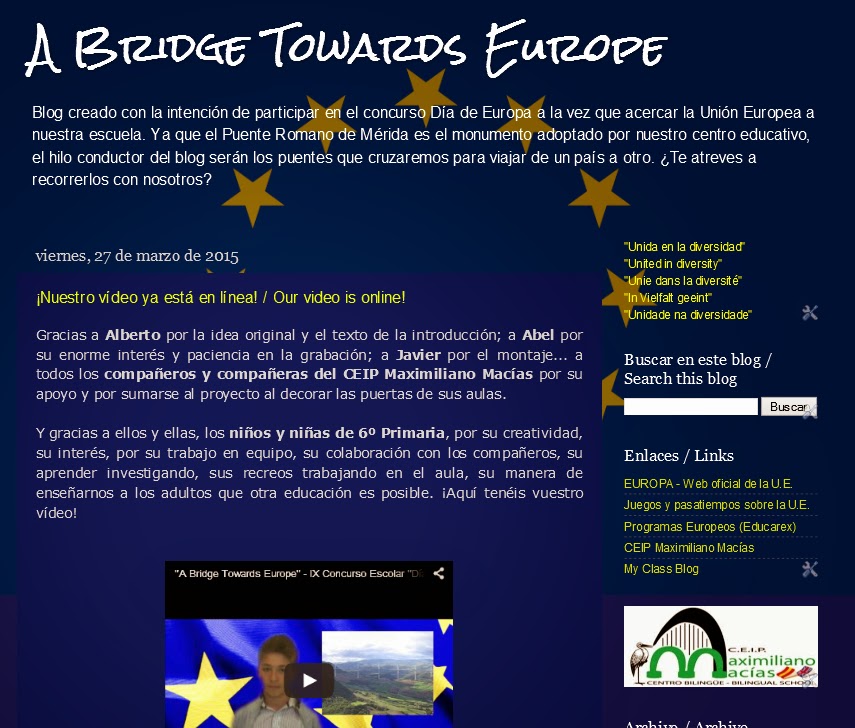
      In Year 6 we joined the IX Concurso Escolar "Día de Europa" school contest. We created and updated a blog with information from every country in the European Union. We also created a mural game, a video and a poster to celebrate Europe Day on the 9th May. 
      In addition to this, the other groups at school wanted to help us and we all decorated our classroom doors. Each group had a different European country. In Year 6 we had Finland and Sweden. In Year 5 we had Netherlands and Belgium.
      We did many more activities, you can have a look at them in our blog A Bridge Towards Europe:


      A Bridge Towards Europe blog capture
      Our blog "A Bridge Towards Europe"

      Tuesday, 24 February 2015

      Life expectancy in Extremadura rises 2 years in last decade

      Dear year 6 students, in Bilingual Science's unit 2 we are studying Spanish population and we are learning about Extremadura too.
      Here you are a very interesting newspaper article on El Periódico Extremadura website about life expectancy in our region. This article will help you understand this concept much better.

      El Periódico Extremadura's article

      Friday, 10 October 2014

      Parts of a computer

      In Year 6's Bilingual Science we are studying new technologies. Last week we had a look at computers and their parts.

      Here you are a video to revise computer parts: